
How to Choose the Right 5V 1A Adapter for Barcode Scanners

What Is a 5V 1A Adapter & Why It Matters for Barcode Scanners
Let’s start simple. A 5V 1A power adapter is a small device that converts your wall power into safe, low-voltage electricity — specifically 5 volts at 1 ampere.
Think of voltage (V) as the pressure pushing electricity through a wire. Think of current (A) as the amount of electricity flowing at once. A 5V 1A charger DC gives your device just the right amount of both.
Barcode scanners run on stable, low-voltage power. Too much voltage can fry the circuit. Too little current means the scanner won’t work properly.
Learn More About USB hardware visit Wikipedia.
Here’s what makes this adapter different from others:
- A 5V 1A linear power supply delivers smooth, consistent power — great for sensitive electronics
- A regular phone charger is often also a 5V 1A input charger, which is why some scanners charge via USB
- The term “adapter,” “charger,” and “power supply” are often used interchangeably — but technically, an adapter converts wall power, a charger also manages battery charging, and a power supply is more industrial
Common devices that use a 5V 1A adapter: barcode scanners, Arduino boards, Raspberry Pi (older models), small routers, LED strips, and USB hubs.
Compatibility Guide: Which 5V 1A Adapter Works with Your Barcode Scanner
This is the most important section. Using the wrong adapter is the #1 cause of scanner damage, slow charging, and frustrating downtime.
Identify Your Scanner’s Power Requirements
Before buying any barcode scanner adapter, check the label on your scanner or its manual.
Look for these three things:
- Input Voltage — Should say “5V” or “DC 5V”
- Input Current — Should say “1A,” “1000mA,” or sometimes “0.5A”
- Polarity — A small diagram showing which end of the DC pin is positive
Most brands like Zebra, Honeywell, TVS, and Netum clearly print this on the back of the device or inside the battery compartment.
Common mistakes users make:
- Assuming any USB charger will work (it won’t always — connector type matters)
- Ignoring polarity on DC barrel connectors
- Using a 12V adapter because it “looks the same” (this will damage your scanner)
- Confusing the barcode scanner charging cable with the adapter itself
A quick tip: if your scanner came with an adapter, note the model number and match it exactly when replacing.
- PCB Manufacturing Online: The 2026 Guide to Sourcing Electronic Components & Lowering Cost Vist – Pcb-Manufacturers
Connector Types Explained (USB, DC Pin, Type-C, Micro USB)
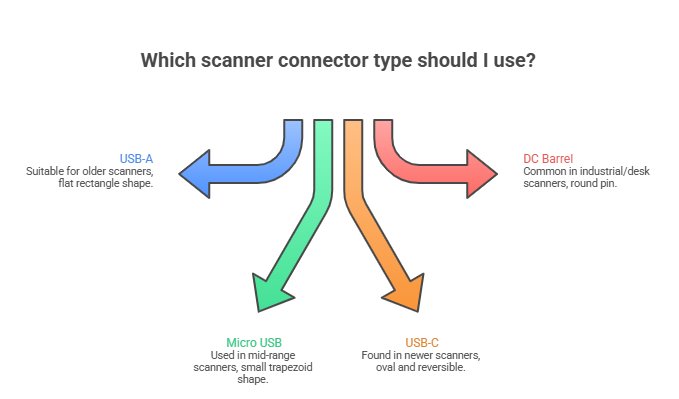
Not all 5V adapters use the same plug. The connector is just as important as the voltage.
Here’s a simple breakdown:
USB-A (Standard USB)
- Flat, rectangular plug
- Common in older wired scanners
- A 5V 1A adapter with USB port can power these directly
- Also used as a barcode scanner USB cable for PC connection
Micro USB
- Small, trapezoidal plug
- Very common in mid-range barcode scanners
- Look for a 5V 1A adapter micro USB — same voltage, different tip
- Popular in Netum and budget scanner brands
USB-C (Type-C)
- Oval-shaped, reversible plug
- Found in newer, modern scanners
- Use a 5V 1A adapter USB-C or 5V 1A adapter type C
- Do not assume all USB-C chargers are the same — always confirm voltage
DC Barrel Jack
- Round pin connector
- Common in industrial and desk-mounted scanners
- Pin sizes vary — 5.5mm outer / 2.1mm inner is the most common
- Matching the pin size is critical — a loose fit can cause intermittent power
A quick visual guide:
| Connector Type | Shape | Common In |
| USB-A | Flat rectangle | Older wired scanners |
| Micro USB | Small trapezoid | Mid-range scanners |
| USB-C | Oval, reversible | Newer scanners |
| DC Barrel | Round pin | Industrial/desk scanners |
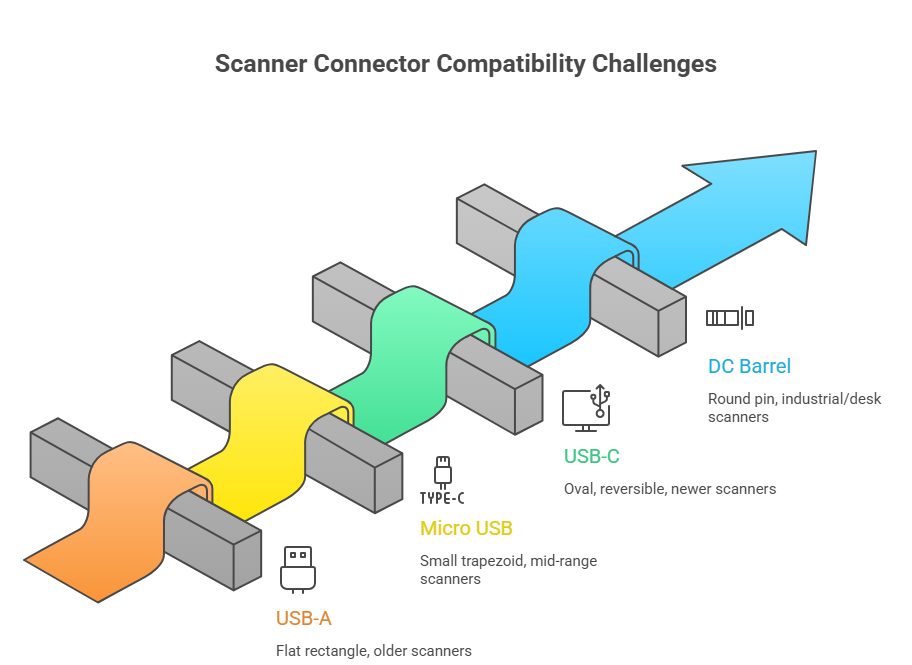
Compatibility Table: Scanner Model vs Adapter Type
Use this table to quickly find the right adapter for your scanner.
| Brand | Common Models | Voltage | Connector | Recommended Adapter |
| Zebra | DS2208, LS2208, DS3608 | 5V | USB-A / DC Barrel | 5V 1A USB or DC adapter |
| Honeywell | Voyager 1200g, 1250g | 5V | USB-A | 5V 1A USB adapter |
| TVS | BS-I101, BS-I302 | 5V | Micro USB / DC | 5V 1A Micro USB adapter |
| Netum | NT-1228, NT-W5 | 5V | Micro USB / USB-C | 5V 1A Micro USB or Type-C |
| Socket | CHS 7/8 Series | 5V | Micro USB | 5V 1A Micro USB adapter |
| Eyoyo | E-series wireless | 5V | Micro USB | 5V 1A Micro USB adapter |
Always verify by checking your scanner’s label. Models can vary even within the same brand.
What Happens If You Use the Wrong Adapter? (Safety Guide)
This is where most people make costly mistakes. The wrong adapter can permanently damage your scanner.
Overvoltage vs Undercurrent Explained
Overvoltage means you’re sending more voltage than the device needs.
- If you use a 9V or 12V adapter on a 5V scanner — the extra voltage has nowhere to go
- Result: overheating, burnt circuits, or permanent damage
- This is why you should never use a 12V adapter for a 5V device
Undercurrent means the adapter can’t supply enough power.
- If your scanner needs 1A but your adapter only provides 0.5A — it’ll charge slowly or not at all
- The scanner may turn on but behave erratically
- This is safe for your device but frustrating to use
The rule is simple:
- Voltage must match exactly (5V = 5V)
- Current (amperage) can be equal to or higher than required — the device only draws what it needs
- SMD Transistor Guide: Codes, Markings, BC547/BC847 Equivalents & TL431 vs TL432 Explained Vist – Smd-Transistor
Common Charging Issues & Fixes
Zebra barcode scanner not charging? Try these steps:
- Check if the barcode scanner charging cable is firmly connected
- Try a different USB port or wall socket
- Confirm the adapter output is exactly 5V
- Inspect the charging port for dust or damage
- Test with a known-working adapter
Symbol / Eyoyo barcode scanner not charging?
- These brands commonly use Micro USB — make sure it’s not a loose or worn-out cable
- A bent connector inside the port is a common hardware issue
- Try wiggling the cable gently — if it only charges at a certain angle, the port may need repair
General troubleshooting checklist:
- Voltage matches (5V)
- Connector type is correct
- Cable is not damaged
- Port is clean and undamaged
- Adapter is not counterfeit or generic low-quality
Buying Guide: Choose Based on Your Use Case
Not all setups are the same. Here’s what to look for based on how you actually use your scanner.
Retail POS Setup
In retail, scanners run 8–12 hours a day. Stability matters more than anything.
What to look for:
- Stable DC output — no voltage fluctuation
- Adapter with surge protection
- Desk-mounted setup usually benefits from a DC barrel adapter — less cable strain
- Prefer branded adapters over cheap generics for continuous use
- A barcode scanner charging station can keep multiple scanners ready at a POS counter
Warehouse & Logistics
Warehouses are rough environments. Scanners take a beating — and so do their adapters.
Key needs:
- Wireless barcode scanner charger — most warehouse scanners are cordless
- Barcode scanner charging dock or multi-bay charging station for teams
- Heavy-duty cable strain relief to prevent wire damage
- Battery-heavy scanners like Zebra MC-series need higher capacity docks, not just basic 5V adapters
Look for:
- Zebra barcode scanner charger (single or 4-bay cradle)
- Honeywell barcode scanner charger with multi-unit support
- IP-rated adapters that handle dust and moisture
Mobile & App-Based Scanning (iPhone / Android)
Here’s the good news — you may not need an adapter at all.
Modern smartphones have powerful built-in cameras. Most barcode scanning tasks can be done with just a free app.
- Can I scan a barcode on my iPhone? Yes — the default Camera app scans QR codes and barcodes natively
- Barcode scanner app for iPhone options include Scanbot, QR Reader Pro, and Zxing
- Works on iPhone 11, iPhone 13, and all recent models
- Android phones work the same way
When you DO need an adapter or external scanner:
- High-volume scanning (200+ items/hour) — phone cameras are too slow
- Scanning in low light or damaged barcode situations
- Integration with POS or inventory software requiring a barcode scanner USB adapter or Bluetooth adapter
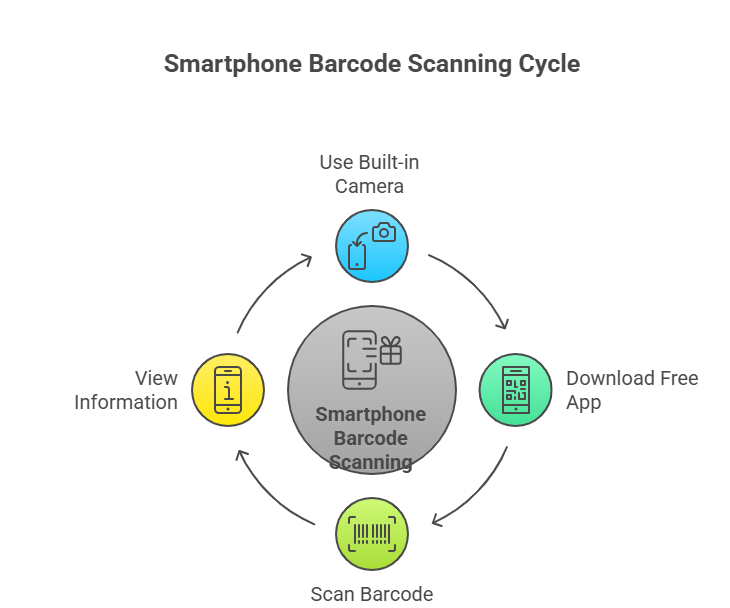
For iPhone users who want a physical scanner: use a barcode scanner adapter for iPhone via Lightning or USB-C, or go wireless with a Bluetooth scanner — no adapter needed for the scanner itself.
5V 1A Adapter Types & Variants Explained
USB vs DC Adapters
USB adapters are the most common type today.
- Plug into any USB wall charger
- Easy to replace — available everywhere
- Work with Micro USB and Type-C cables
- Best for: modern scanners with standard charging ports
DC barrel adapters are more specialized.
- Have a fixed round pin connector
- Usually come with the scanner out of the box
- Harder to replace — need to match pin size
- Best for: older or industrial desk-mounted scanners
Micro USB vs Type-C Adapters
Micro USB is still very common in scanners sold today.
- Older standard but still widely supported
- Cables are cheap and easy to find
- A 5V 1A adapter micro USB is usually the most affordable option
USB-C (Type-C) is the new standard.
- Reversible — no more plugging in the wrong way
- Supports faster charging in higher-amp versions
- A 5V 1A adapter USB-C is what you need if your scanner has a Type-C port
- Do not use a fast-charging USB-C adapter (like 65W laptop chargers) — they may push too much voltage
Branded vs Generic Adapters
Branded adapters (Samsung, Apple, etc.):
- A 5V 1A adapter Samsung or 5V 1A adapter Apple is a safe choice
- Well-regulated output — voltage doesn’t spike
- More expensive but reliable
- Apple adapters are especially tight on voltage regulation — great for sensitive electronics
Generic adapters:
- Much cheaper
- Quality varies wildly — some are safe, many are not
- Risk of voltage spikes that damage your scanner
- Look for CE, FCC, or BIS certification marks as a minimum quality check
Bottom line: For daily professional use, invest in a quality adapter. For occasional home use, a certified generic is acceptable.
Technical Deep Dive (Simplified) – How 5V 1A Works
Voltage vs Current (Simple Explanation)
Think of electricity like water flowing through a pipe.
- Voltage (V) = water pressure
- Current (A / Amperes) = how much water flows per second
- Power (W / Watts) = pressure × flow = 5V × 1A = 5 Watts
Your barcode scanner needs exactly 5 watts of power delivered at the right pressure (5V) and flow rate (1A).
Too much pressure (overvoltage) bursts the pipe. Too little flow (undercurrent) and nothing works properly.
Power Stability & Device Safety
A 5V 1A linear power supply is smoother and more stable than a switching power supply.
- Linear supplies have less electrical noise — important for sensitive scanner circuits
- Switching supplies are more compact and efficient but can have minor fluctuations
- For barcode scanners, either works — but avoid ultra-cheap switching supplies with no regulation
Signs of an unstable adapter:
- Scanner randomly restarts
- Charging indicator flickers
- Adapter gets very hot to touch
- If your adapter is too hot to hold for 3 seconds, replace it immediately
Basic Circuit Understanding
Curious how a 5V adapter circuit diagram works? Here’s the simplified version:
- Wall power (220V AC) enters the adapter
- A transformer steps it down to low voltage
- A rectifier converts it from AC to DC
- A voltage regulator locks the output at exactly 5V
- Clean 5V DC exits through the cable to your scanner
The 5V 1A charger circuit is essentially a voltage-regulating transformer in a plastic shell.
For Arduino users: this is the same reason a 5V adapter for Arduino works so well — stable DC power is exactly what microcontrollers need.
- Want to Purchase all Good Quality Electronic component At Good Price Visit – edzeal.in .
Step-by-Step Adapter Selection Checklist
Use this before every adapter purchase. It takes 2 minutes and saves you from buying the wrong one.
Step 1: Check Voltage
- Look at the back of your scanner or the manual
- Confirm it says “5V” or “DC 5V”
- Adapter must output exactly 5V
Step 2: Match Current
- Check required amperage (usually 0.5A or 1A)
- Adapter current must be equal to or greater than required
- A 5V 2A adapter is safe for a 5V 1A device — it won’t overpush current
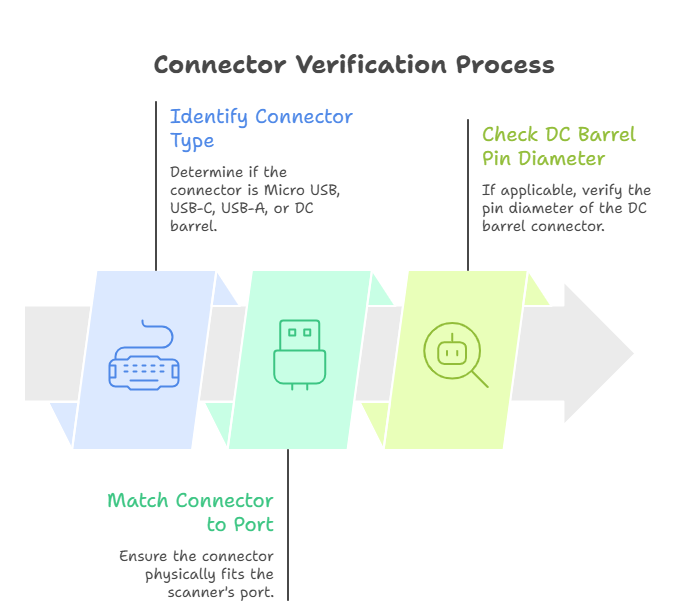
Step 3: Verify Connector
- Is it Micro USB, USB-C, USB-A, or DC barrel?
- Connector must physically match the scanner’s port
- Check DC barrel pin diameter if applicable
Step 4: Choose Quality
- Is it a branded or certified adapter?
- Look for CE / FCC / BIS markings
- Avoid adapters with no certification and suspiciously low prices
Quick Decision Tree:
Does your scanner have a USB port?
→ Yes → Does it use Micro USB or Type-C?
→ Micro USB → Use 5V 1A Micro USB adapter
→ Type-C → Use 5V 1A USB-C adapter
→ No → Does it use a DC barrel jack?
→ Yes → Match pin size (usually 5.5mm/2.1mm) + use 5V 1A DC adapter
→ Not sure → Check scanner label or contact manufacturer
FAQs
What does a 5V 1A adapter look like?
It looks like a standard phone charger — a small plastic block that plugs into the wall, with a cable or USB port coming out. The output label will say “5V — 1A” or “Output: DC 5V 1000mA.” Most are white or black and about the size of a matchbox.
Can I use a higher amp adapter (e.g., 5V 2A) for my scanner?
Yes, safely. Amperage is pulled by the device, not pushed by the adapter. A 5V 2A adapter connected to a 5V 1A device will only deliver 1A. Voltage must always match — amperage can be higher.
Can I charge my barcode scanner with a phone charger?
Often yes — if the voltage is 5V and the connector matches. Most modern phone chargers output 5V. Just confirm the connector type (Micro USB vs Type-C) and the output voltage on the label. Avoid using fast chargers (15W, 25W, 65W) as some dynamically adjust voltage above 5V.
How do I connect a barcode scanner to a PC?
Most wired scanners use USB and work like a plug-and-play keyboard — no driver needed. Simply plug the barcode scanner USB cable into your PC’s USB port. The scanner will appear as an input device. For wireless scanners, use the included USB receiver or pair via Bluetooth in your PC settings.
Can you scan a barcode from your phone?
Yes. Open your phone’s camera and point it at a barcode — most smartphones (iPhone and Android) detect barcodes and QR codes automatically. For more advanced scanning, use a barcode scanner app for iPhone or Android. You can even scan barcodes through light sellotape, though heavy wrapping may cause read errors.
Conclusion
Choosing the right 5V 1A adapter for your barcode scanner doesn’t have to be complicated. The key is matching three things: voltage, current, and connector type.
Use the compatibility table, follow the checklist, and always buy from certified sources. A quality adapter protects your scanner and keeps your operations running smoothly — whether you’re at a retail counter, warehouse floor, or scanning on the go.
Ready to find the right adapter? Browse Edzeal’s range of 5V adapters — compatible with Zebra, Honeywell, TVS, Netum, and more. The right fit is just a click away.
What to read next
-

By EDZEAL | June 6, 2026
Mylar Speakers 40mm Magnet, 29mm & 27mm Magnet – Complete Buying Guide
What Are Mylar Speakers? What Is a Mylar Speaker? A mylar speaker is a small, lightweight speaker that uses a thin plastic film — called Mylar — as its diaphragm.
-

By EDZEAL | May 30, 2026
Zener Diode vs Normal Diode: Which One is Better for Electronics?
When you build an electronic circuit, every component matters. Choosing the wrong diode can damage your circuit or make it stop working altogether. Two diodes often cause confusion — the
-

By EDZEAL | May 18, 2026
What is a Glass Fuse Small & Fuse Holder? Types, Uses, Sizes & Buying Guide
What is a Glass Fuse Small? A small glass fuse is a tiny safety device used in electronic circuits. It protects your device from too much current flowing through it.